
Claude Skills are reusable instruction sets that turn Claude from a general-purpose assistant into a specialized one. Released by Anthropic in October 2025 and now adopted across six major AI platforms, Skills let anyone — no coding required — package their workflow into a folder that Claude loads automatically whenever the task comes up. Build it once, use it forever.
What Are Claude Skills and Why Should You Care?
If you've ever found yourself explaining the same thing to Claude over and over — your file structure, your formatting preferences, where your code lives — Skills exist to solve that problem permanently.
A Skill is a folder containing a SKILL.md file with instructions, templates, and resources that Claude can discover and load automatically when it recognizes a relevant task. Think of it as onboarding materials for your AI assistant. Instead of repeating yourself every session, you teach Claude once, and it remembers how you work.
Anthropic released Skills in October 2025, and the feature has since been adopted as an open standard. Microsoft integrated Skills support into VS Code and GitHub Copilot. OpenAI adopted the format for Codex CLI. Cursor, Goose, Amp, and several other AI tools implemented compatible skill loading. That means a Skill you build for Claude can potentially work across multiple AI platforms.
The key properties that make Skills powerful: they're composable (multiple Skills can stack together automatically), portable (same format works everywhere), and efficient (Claude only loads what it needs, when it needs it). Most importantly, most Skills require zero coding. You write instructions in plain English.
Skills aren't just for developers. Anthropic designed them so that anyone on a Pro, Max, Team, or Enterprise plan can create and upload custom Skills. The built-in "skill-creator" skill even walks you through the process — Claude asks about your workflow, generates the folder structure, and formats everything for you.
How I Built a Skill That Updates My Website
Here's a real example. My website is HTML code that Claude actually wrote for me. Every time I wanted to make a change — update a section, add new content, fix something — I had to go into GitHub, find the right file, edit the code, and push it live. It worked, but it was a lot of steps for what should be simple.
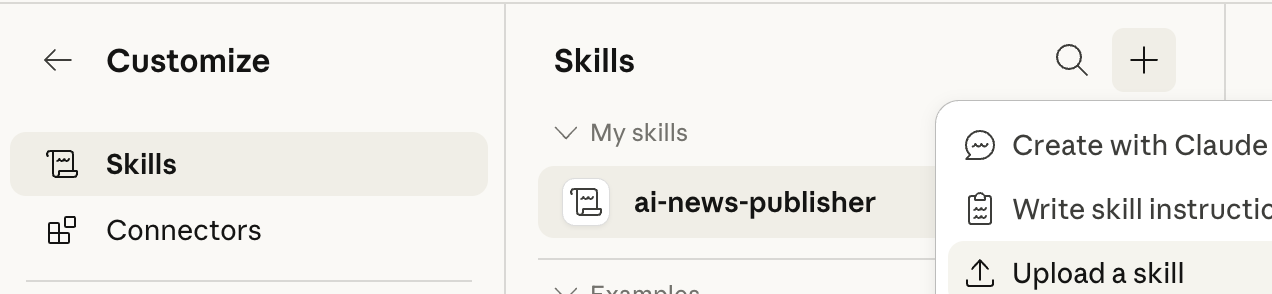
So I told Claude: I want a Skill that can update my website for me. Claude helped me write out all the instructions as an MD file — where my code lives, how my site is structured, what to do when I want changes made. Then I went to Customize, clicked on Skills, and hit the plus sign to upload the new Skill.
Now whenever I want to update my site, I just type the slash command, tell Claude what I want changed, and it's done. No GitHub. No code editing. No switching between tools. The article you're reading right now was published exactly this way.
That's the real power of Skills. You're not just saving time on one task — you're eliminating an entire workflow permanently.
The reason Skills matter isn't just automation — it's personalization at scale. Every business has unique workflows, unique file structures, unique ways of doing things. Custom instructions tell Claude who you are. Skills tell Claude how you work. That's the difference between a general assistant and a true digital coworker. And the fact that this is an open standard means your investment in building Skills isn't locked into one platform.
Building a Skill doesn't require technical knowledge, but it does require clarity about your own process. The more specific your instructions, the better Claude performs. Include things like: where your files live, what format you expect, what steps happen in what order, and what the final output should look like. Claude's skill-creator will guide you through all of this conversationally.
What Can You Build a Skill For?
The short answer is: anything you repeat. If you find yourself explaining the same workflow to Claude more than twice, that's a Skill waiting to be built. Here are some real categories people are building Skills for:
Content publishing — like my website example, or automating blog posts, newsletters, and social media content with your exact voice and format.
Document creation — teaching Claude your company's report template, proposal format, or slide deck structure so every output matches your brand.
Data workflows — scanning news sources, updating spreadsheets, pulling research into organized formats.
Code and deployment — automating GitHub pushes, file organization, testing pipelines, and build processes.
The Skills Directory already features professionally-built Skills from companies like Notion, Figma, and Atlassian, designed to work with their MCP connectors. But the custom Skills you build yourself are where the real transformation happens, because nobody knows your workflow better than you.
Claude Skills eliminate the gap between what AI can do and what AI knows about how YOU work. Building a Skill takes minutes, requires no coding, and automates your workflow permanently. Whether you're publishing content, generating reports, or managing files, the process is the same: teach Claude once, use it forever. The only question is what you'll build first.