
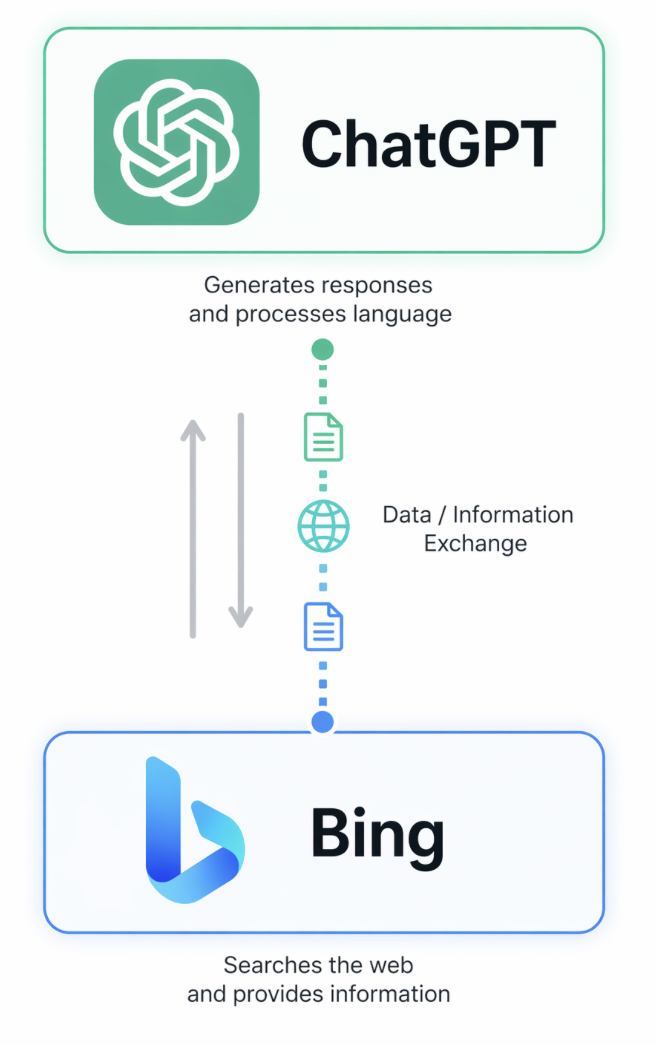
ChatGPT doesn't search the web using your exact question. It rewrites your prompt into a short, keyword-based query and sends that to Bing. You can reveal the actual query in under 60 seconds by opening DevTools, filtering the Network tab by your conversation ID, and searching for "search_model_query." That hidden phrase — not your original question — is what your website needs to match.
Why Isn't Your Website Showing Up in ChatGPT Answers?
If you've been writing blog posts, optimizing pages, and doing everything right for Google — but ChatGPT still won't cite you — there's a simple reason. ChatGPT isn't searching what you think it's searching.
As of early 2026, ChatGPT has 900 million weekly active users and holds roughly 60.4% of the AI search market. When one of those users asks a question, ChatGPT doesn't type their full prompt into Bing the way a human would. It runs the question through a layer called Prometheus — Microsoft's AI model that connects ChatGPT to Bing's live search index. Prometheus takes your long, conversational prompt and compresses it into a short, keyword-based search string. That compressed string is what actually gets sent to Bing.
Bing then returns a ranked list of web pages. ChatGPT reads those pages. It pulls quotes, facts, and citations from them. And it uses them to build the answer you see on screen.
Here's the problem: most website owners are optimizing for the full, natural-language question — the way a human would ask it. But ChatGPT is almost never searching with that exact phrasing. It's searching with something shorter, more literal, and more keyword-dense. If your page doesn't match the reformulated query, Bing doesn't rank you, and ChatGPT doesn't see you. You stay invisible.
How Do You See the Exact Words ChatGPT Sends to Bing?
Here's the exact process. It takes about 60 seconds once you've done it once.
Step 1. Open ChatGPT and ask the question you want your website to show up for. Something your ideal customer would actually ask.
Step 2. Look at the URL at the top of your browser. After the "/c/" there's a long string of letters and numbers. That's your conversation ID. Copy everything after the "c/".
Step 3. Right-click anywhere on the page and click Inspect. That opens Chrome DevTools. At the top of the panel, click the Network tab.
Step 4. In the filter box, paste the conversation ID you copied. Then refresh the page. The list on the left will populate with network requests.
Step 5. Find the largest entry labeled Backend API Conversation. Click it.
Step 6. With that entry open, press Ctrl + F (Cmd + F on Mac) and search the code for search_model_query.
What appears directly below that line is the actual query ChatGPT sent to Bing to generate its answer. That's the hidden phrase — the real target. That phrase, not your original question, is what your website content needs to match.
This is the real difference between SEO and AEO. Traditional SEO rewards content written for the natural, conversational questions real humans ask. Answer Engine Optimization rewards content written for the machine-reformulated query that actually hits the search index. If you don't close that gap, you can have the best answer on the internet and still never be cited. The winners in AI search aren't the people writing more content. They're the people writing the right content — content that matches what the AI is actually searching for.
Once you see it, you'll understand instantly why your current content isn't getting cited. The reformulated query is almost always shorter than the user's question, more literal, and written in keyword shorthand. It's the gap between how people talk and how machines search. Most people never look at the Network tab because they don't know it's telling them the answer for free. ChatGPT is literally showing you what it's searching. You just have to know where to look.
What Do You Do With the Reformulated Query?
Once you've captured the exact phrase ChatGPT is searching, three moves turn that information into citations.
First, rewrite your page to match. Put the reformulated query — or a close variant of it — into your H1, your first paragraph, and your meta description. This is the single biggest lever. Bing's ranking algorithm still prioritizes keyword match. If your page is the closest match to what ChatGPT is searching, it climbs the results page, and ChatGPT pulls from it.
Second, add a direct answer capsule. Right underneath your H1, write a 40-to-60-word answer to the question in plain language. No links, no fluff — just a self-contained quote that any LLM can lift and cite without needing the rest of your page. This is the format Google's AI Overviews and ChatGPT both favor. 68% of consumers now start product research in ChatGPT or Perplexity before visiting a brand website — which means the quote block is often the only thing they see. Make it count.
Third, repeat the process for every high-value question in your niche. Each question generates its own reformulated query. Each reformulated query is a separate optimization target. Over time, you build a library of pages that each match exactly what ChatGPT is searching for — and your citation rate compounds.
This is the workflow I use. It's the workflow I teach inside ChatifyIT. And it works because it's not guessing. You're looking directly at what the machine is doing and matching it.
If you skip this step and keep writing for the user's question, you're writing for a search engine that doesn't exist. The only question ChatGPT is actually asking is the one hidden in the Network tab. Go find it.
Ranking inside ChatGPT starts with knowing what ChatGPT is actually searching — not guessing. Use DevTools → Network → search_model_query to reveal the reformulated query behind any answer, then rewrite your H1, your first paragraph, and your answer block to match that exact phrasing. That's how you get cited.