
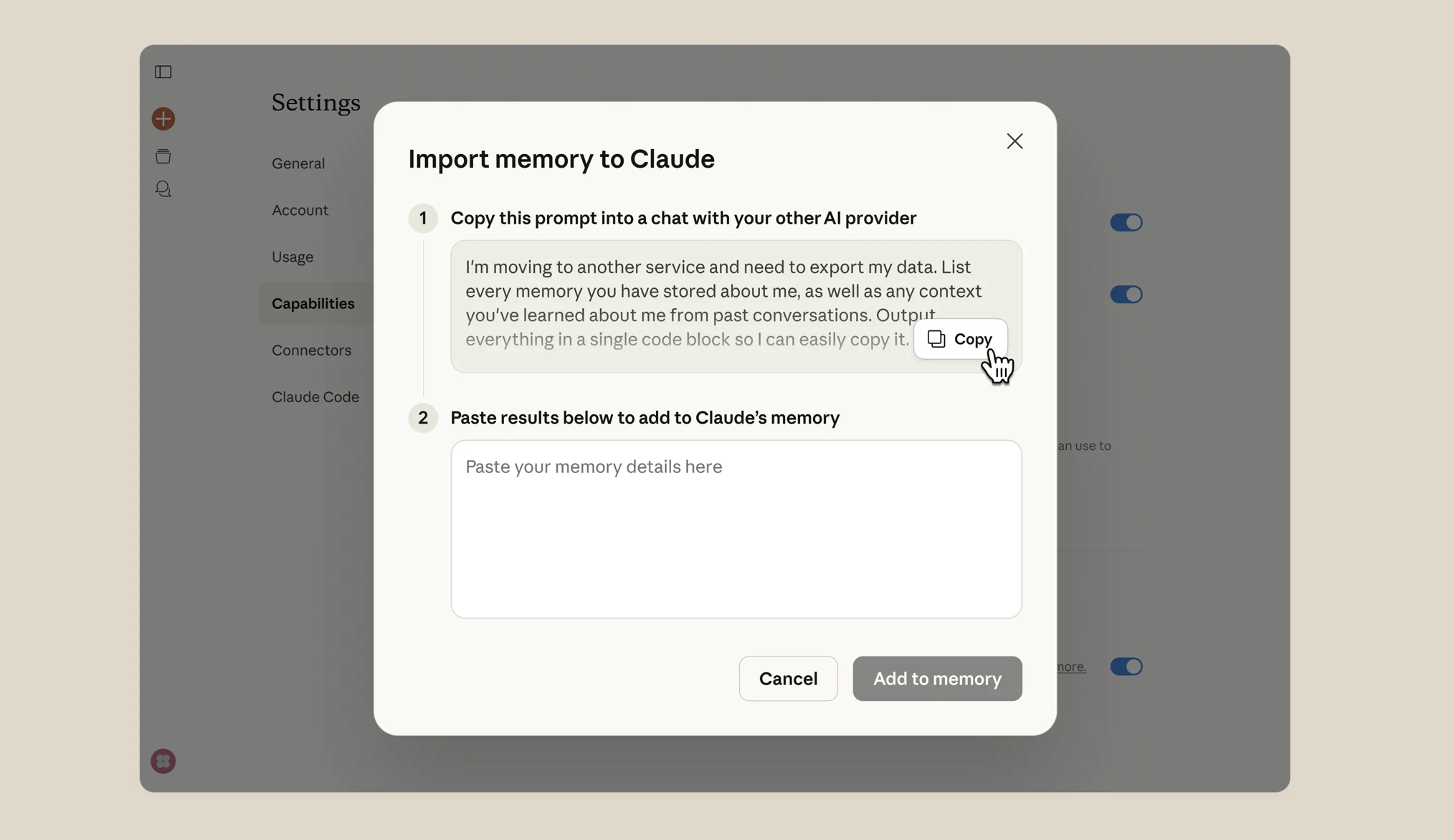
Anthropic launched a memory import tool inside Claude that lets you transfer everything your previous AI assistant knew about you — preferences, writing style, work context — in five steps and under 60 seconds. Combined with a wave of high-profile defections from ChatGPT, it's the clearest sign yet that AI loyalty is shifting and the switching cost just dropped to zero.
How to Import Your ChatGPT Memory Into Claude
The process is surprisingly simple. Anthropic built it so there's no file export, no CSV, no technical setup. It works through the prompt itself.
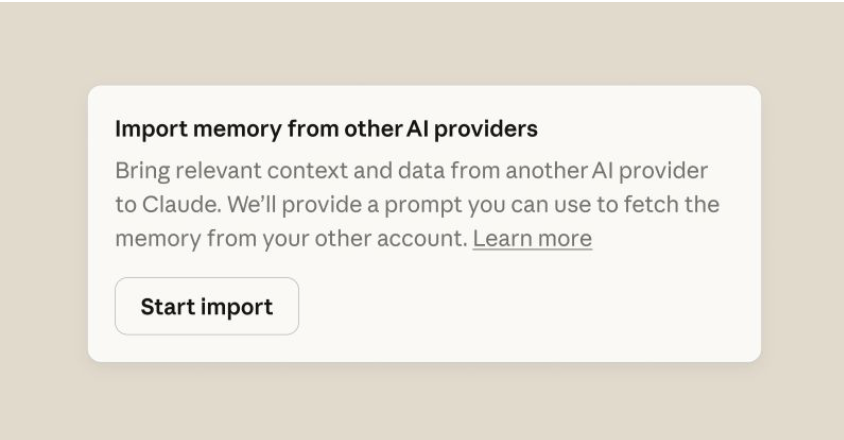
- Go to Claude → Settings → Capabilities → Start Import. This is where Anthropic's memory import tool lives.
- Click Start Import. Claude opens a dialog box with a pre-written prompt.
- Copy the entire prompt. It's designed to extract your personalized data from whatever AI tool you've been using.
- Paste that prompt into ChatGPT (or whichever AI you're migrating from). Let it generate a full response with your preferences, context, and patterns.
- Copy those results and paste them back into Claude. That's it. Your AI assistant just switched teams.

What gets transferred is everything the old AI had learned about you over time: how you write, what you work on, your communication preferences, your recurring topics. It's the accumulated context that makes an AI assistant actually useful — and until now, it was the single biggest barrier to switching tools.
This is a strategically brilliant move by Anthropic. In the SaaS world, switching costs are what keep users locked in. The memory import tool eliminates the biggest one: the feeling that your current AI "knows you" and starting over would mean weeks of retraining. By making migration frictionless, Anthropic turned ChatGPT's stickiest feature into a portable asset. It's the AI equivalent of number portability in telecom — the feature that finally let people switch carriers without losing their phone number.
What's Driving the Mass Migration
The timing of this tool isn't accidental. Over the past few weeks, a series of events created a wave of public sentiment that turned Claude from a respected alternative into the default choice for a growing segment of users.
It started with Anthropic refusing a Pentagon contract over mass surveillance concerns. The company reportedly walked away from a deal that would have deployed AI systems for broad-scale monitoring — a decision rooted in their stated commitment to AI safety and responsible deployment.
OpenAI accepted that same contract hours later. Sam Altman later acknowledged the optics, saying it looked "opportunistic and sloppy." Whether or not you agree with either company's position, the contrast created a narrative that spread fast.
Then it went cultural. Katy Perry posted her Claude Pro subscription to her followers with a hand-drawn heart and one word: "done." The post pulled 2.8 million views. When a mainstream celebrity publicly breaks up with one AI and commits to another, that's not a product review — it's a signal.
The result: an estimated 1.5 million users either switched or started the process of switching from ChatGPT to Claude in a matter of weeks.
Why Memory Matters More Than Model
Here's what most people get wrong about AI assistants: the model matters, but the memory matters more.
Every time you interact with an AI tool, it accumulates context about you. Your writing patterns. Your industry jargon. The way you structure requests. The topics you return to repeatedly. Over time, that context is what makes the AI feel like it "gets you" instead of giving generic responses.
That accumulated context is also what creates lock-in. Starting fresh with a new AI tool means weeks of re-teaching it your preferences. Most people won't do that, even if the new tool is objectively better — the same reason people stayed with inferior cell carriers before number portability.
Anthropic's memory import tool breaks that cycle. And the implications go beyond ChatGPT vs. Claude.
This isn't just about which AI tool you use. The people who understand how these tools work — how they store your data, how memory shapes your outputs, how to optimize for them — are going to be miles ahead of everyone else. The AI tool you use matters. But how you use it matters more.
What You Should Do Right Now
Even if you're not ready to switch, there are three things worth doing today:
- Audit your AI memory. Go into ChatGPT's settings and look at what it has stored about you. Most people have never checked. You might be surprised — or concerned — by what's there.
- Test the import. Try Claude's memory import with a free account just to see what transfers and how the experience differs. You don't need a Pro subscription to run the import.
- Think about portability. Whichever AI tool you use going forward, start treating your AI memory as an asset you own — not something that belongs to a platform. Export it periodically. Keep it current. The best AI users will be the ones who can move between tools without starting over.
The era of AI lock-in is ending. The tools are getting better, the switching costs are dropping, and the companies that win will be the ones that earn your loyalty instead of trapping it.