
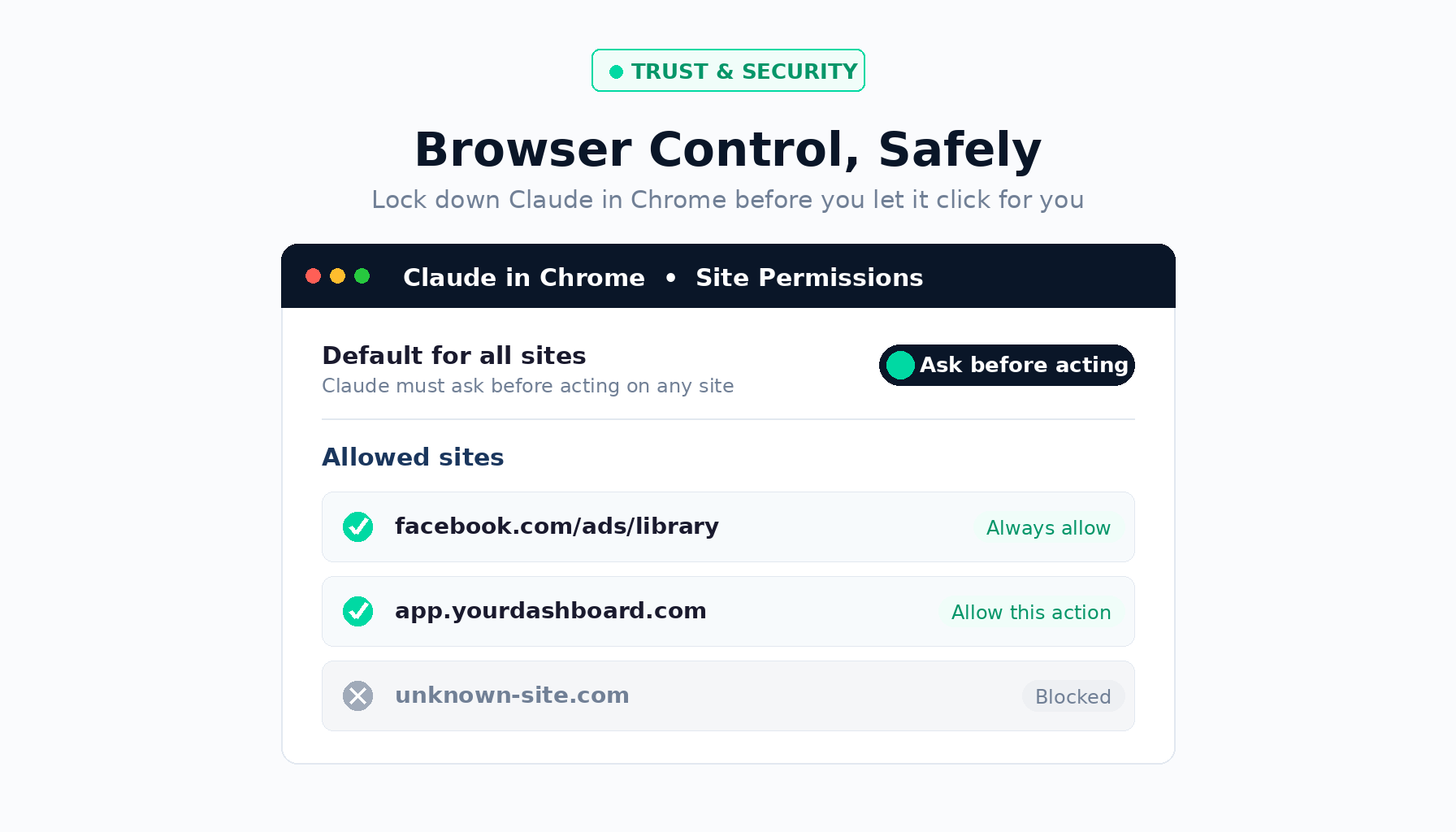
Claude in Chrome lets the AI act inside your browser — clicking, typing, and navigating sites on your behalf. It's powerful but carries prompt-injection risk, where hidden instructions on a webpage hijack the agent. Anthropic cut its internal attack success rate to roughly 1%, but the safe move is to restrict Claude to a short allowlist of sites you trust.
What Does Claude in Chrome Actually Do?
Claude in Chrome is Anthropic's official browser extension — not a third-party tool — that gives Claude the ability to operate your browser the way a research assistant would. It reads pages, fills out forms, clicks buttons, and moves between sites. Instead of copying and pasting between tabs, you hand Claude a task and it carries it out directly on the page in front of you.
Anthropic expanded the extension from a limited research preview to a wider beta, and it's now available across paid plans. The appeal is obvious for anyone doing repetitive web work: pulling numbers from a dashboard, navigating an ad library, or filling out the same intake form a dozen times. The catch is that to be useful, the agent has to read and act on web content it can't fully trust — and that is exactly where the risk lives.
That last point matters. A 1% success rate sounds tiny until you remember that a browser agent may encounter hundreds of pages, ads, and embedded scripts in a single session — each one a potential attack surface. Anthropic itself is clear that no browser agent is immune. The number is a measure of progress, not a clean bill of health.
What Are the Real Security Risks?
The core threat is prompt injection: malicious instructions hidden inside a webpage that the agent reads and obeys as if you had typed them yourself. The instructions don't have to be visible to you. They can be buried in white-on-white text, encoded into an image, or disguised as a normal-looking interface element. The agent processes the page's content, the hidden command rides along, and suddenly the assistant is doing something you never asked for.
Anthropic frames the danger with a simple example: you ask Claude to read your inbox and draft replies to meeting requests. One email — dressed up as a routine vendor inquiry — contains hidden text telling the agent to forward every message marked "confidential" to an outside address first. You see a helpful assistant drafting replies. In the background, your private mail is walking out the door.
This isn't hypothetical. Security researchers have already demonstrated working attacks against Claude's extension. One disclosed chain, nicknamed "ShadowPrompt," showed how a website could silently inject commands into the assistant with no clicks and no permission prompt — simply visiting the page was enough. A separate flaw researchers called "ClaudeBleed" showed how another browser extension could hijack Claude's capabilities and inherit its access. Anthropic has patched these specific issues and hardened the underlying model, but the category of attack isn't going anywhere. As long as agents read untrusted web content, someone will try to smuggle instructions into it.
Here's how I think about it: the vulnerability isn't really the tool — it's the default permissions. Most people install the extension, leave it able to act on every site, and never look at the settings again. That's the dangerous part. Treat a browser-control AI like you'd treat a new employee with your passwords. You don't hand them the keys to everything on day one. You give them access to one or two things you trust, watch how it goes, and expand from there. The setup takes about ninety seconds, and it's the single highest-leverage security move you can make.
None of this means you should avoid the tool. It means you should configure it deliberately instead of accepting whatever it does out of the box. The difference between "risky" and "useful" here is almost entirely a settings decision — one that takes less time than reading this paragraph twice.
How Do You Set Up Claude in Chrome Safely?
The fix lives in the extension's permission settings. Open the Claude extension, click the three dots in the top-right of the side panel, and go to Settings → Site Permissions. From there, three moves give you most of the protection:
- Set the default to restrictive. Rather than letting Claude act freely on every site, set it so Claude must ask before acting — or is blocked entirely — on any site you haven't explicitly approved. This single change turns "act everywhere by default" into "act nowhere until I say so."
- Build a short allowlist. Add only the specific sites you actually want Claude working on — for example, an ad library or a dashboard you use every day. Everything else stays off-limits. A short list is a feature, not a limitation.
- Prefer "Allow this action" over "Always allow." Per-action approval lets you review each step before it happens. Reserve "Always allow actions on this site" for the small number of sites you completely trust and use constantly.
Then test it. Open the extension on a site you didn't approve and confirm it can't act — it should sit there, blocked. Then open one you did approve and watch it work normally. That contrast is the whole point: Claude only operates where you've explicitly said yes, and stays inert everywhere else.
Should You Trust Browser-Control AI at All?
It's a fair question, and the honest answer is: trust it the way you trust any powerful tool — conditionally, and with guardrails. Browser agents represent a real shift in how we work online. The productivity gains are genuine, especially for repetitive, click-heavy tasks that eat hours every week. But "powerful" and "safe by default" are not the same thing, and the companies building these tools are openly telling us so.
What's encouraging is the direction of travel. Anthropic publishes its attack-success numbers instead of hiding them, runs internal red teams, and ships defenses like classifiers that scan untrusted content before it reaches the model. That transparency is exactly what you want to see from a company handing an AI the keys to your browser. The responsibility that remains on your side is small but non-negotiable: don't run it wide open. Configure permissions, keep your allowlist tight, and stay in the loop on what it's doing — especially early on.
Claude in Chrome is genuinely useful for repetitive web work, but its safety depends entirely on how you configure it. Don't let it act on every site by default. Set permissions to ask-or-block, allowlist only the handful of sites you trust, and approve actions one at a time. Ninety seconds of setup turns a real prompt-injection risk into a controlled, useful assistant.